Quick guide
FFFTP Mac is an FTP client: it connects your Mac to an FTP server so you can send and receive files.
It brings the well-known Windows FTP client FFFTP to the Mac, with the same window layout and the same way of working.
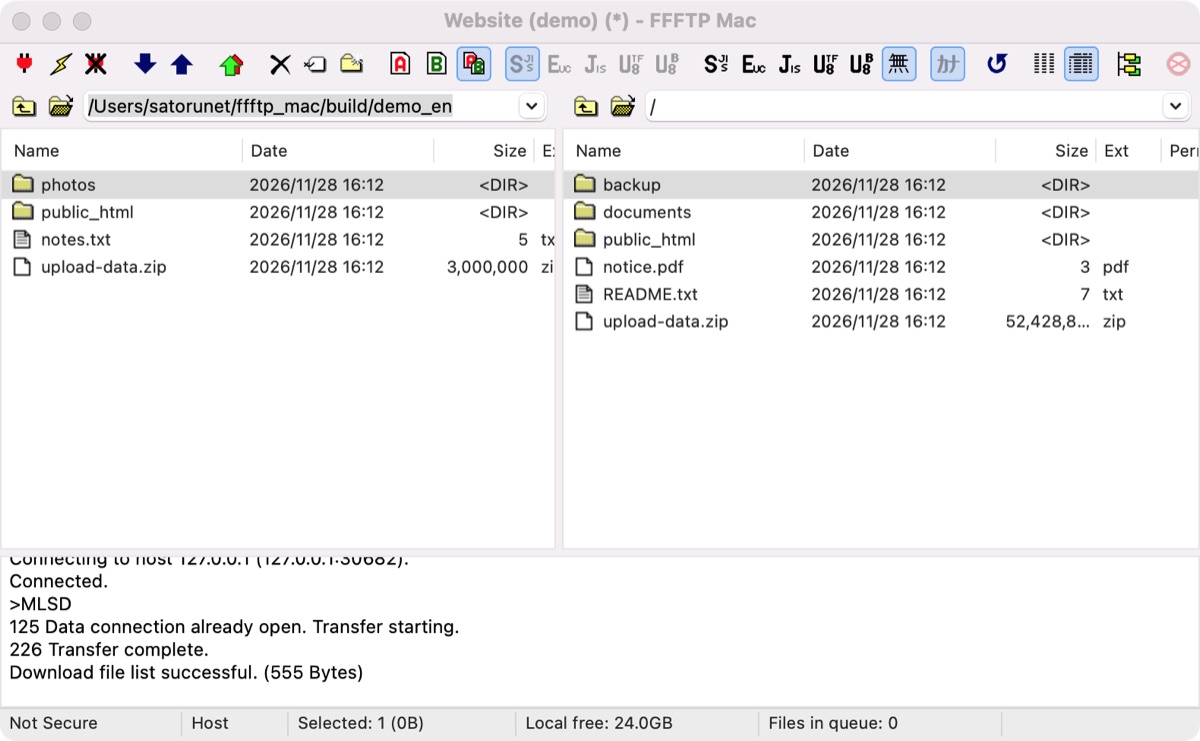
The FFFTP Mac window. Left: this Mac (local). Right: the server (host). Bottom: the log of what happens (task window).
If you are new, read the pages in order. Each takes a few minutes.
- Getting started (install and update)
- Register a host and connect
- Connect with SFTP / SCP (SSH)
- Dial-up and VPN
- Transfer files
- Work with files and folders
- Mirroring (keep a whole folder in sync)
- Move from FFFTP on Windows
- Carry your settings on a USB drive (INI file)
- Handy features
- Advanced features (firewall, UPnP, command line, debug, NonStop Server)
- Troubleshooting
To look up a menu or dialog item by item, see the "Full manual" tab of the contents (based on the original FFFTP help; currently in Japanese only).